If the bank asked for your Udyam certificate and your business is already registered, send a copy of the existing certificate. The registration number is permanent. You can print the certificate again.
Read the request from the branch first. If it only says "business proof", ask which document it will accept for this account. A Telangana shop owner who was asked for a labour licence can check which paper to take to the bank. If the branch named Udyam, use the route below that fits your business.
I have my Udyam number
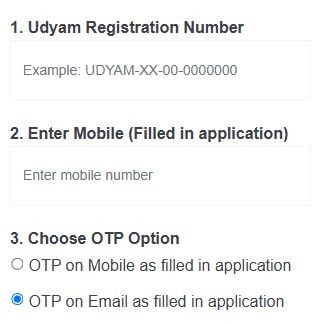
Have your Udyam registration number, the mobile number entered in the application and access to the registered mobile or email. The number has this format: UDYAM-XX-00-0000000. This is a format example.
Open Print Udyam Certificate on the government portal. The page heading says "Udyami Login".
Enter the registration number and the mobile number from the application. Even if you want the code by email, the mobile number field is still required.
Choose the registered mobile or email for the one-time password (OTP). Enter the verification code shown on the page, then select "Validate & Generate OTP".
Enter the OTP, sign in and print or save the certificate as a PDF.
Open the PDF before sending it. Match the enterprise name and registration number to the business the bank is checking. The QR code on the certificate opens its government record. Keep the PDF and the branch's request together.
Example. Your business has a new shop sign, but the bank is opening the account for the same enterprise. Check the name against the existing certificate and tell the branch about the trading name. A second download gives you a copy of the existing record.
I've lost the number
First look in your saved PDFs, bank correspondence and registration email. If you still cannot find the number, open Forgot Udyam/UAM Number.
Choose "Udyam Registration" for a Udyam number. Choose the separate Udyog Aadhaar Memorandum option if your old paper is headed UAM.
Select mobile or email. Enter the contact that was used for the registration, then request and validate the OTP.
The portal shows the registered number or numbers linked to that contact. Use the one for this enterprise, then return to the print screen.
If the OTP does not arrive, check the selected contact and the email spam folder. If you no longer control either registered contact, open MSME CHAMPIONS, the grievance service linked by the Udyam portal. Tell the help desk which contact you lost access to and what happened on the recovery screen. Keep its reference while you wait. You can also ask the branch which other proof it accepts in the meantime.
I've never registered
Ask the branch whether Udyam is required for this account. If it is and you have never registered the enterprise, check both the investment and turnover limits on the official Udyam portal. The limits below apply from 1 April 2025.
Category | Investment limit | Annual turnover limit |
|---|---|---|
Micro | Rs 2.5 crore | Rs 10 crore |
Small | Rs 25 crore | Rs 100 crore |
Medium | Rs 125 crore | Rs 500 crore |
Investment here means investment in plant and machinery or equipment. If the business qualifies, choose New Registration. Have the Aadhaar for the person the portal specifies for your type of business, the enterprise PAN and the GST details where applicable. Government registration is free. If you already hold an old UAM, use the portal's migration route.
If the form asks for bank details you do not have yet, explain this to the branch and ask which interim proof it accepts. Once the portal issues the Udyam number and certificate, check the enterprise name and save the PDF. The bank can then check the certificate for the account.