Worked example
Checking November wages? Open the two November payment proofs.
Balaji receives two files from payroll. One is an EPF challan with a reference number. The other is a list of employee contributions from the ESI portal. Before he closes December, he wants to know one thing: did the money reach each scheme? This is the check he can do with payroll.
1. Which month and which schemes are we checking?
Start with the December 2026 wage register and the establishment it belongs to. If December wages were paid in January, ask payroll to show the wage month on each return. A January bank date alone does not tell you which month's contribution was paid.
Confirm EPF and ESI coverage separately for the establishment and the employees concerned. Ask payroll to use its EPFO establishment ID and ESIC employer code. If just one scheme applies, record why and check that one. If coverage is uncertain, have payroll verify it before marking the month complete.
Wage month | Normal payment date for each applicable scheme |
|---|---|
December 2026 | Friday, 15 January 2027 |
January 2027 | Monday, 15 February 2027 |
February 2027 | Monday, 15 March 2027 |
The EPF payment rule gives a regular employer 15 days from month-end to remit. The ESI rules also set a 15-day window for the monthly contribution return and for payment. For regular December wages both dates fall on 15 January 2027. A relief notice for a different wage month does not change December's date.
2. EPF: what does a paid challan look like?
Ask payroll for the approved December Electronic Challan-cum-Return (ECR) and the payment receipt for each challan used to settle it. Match the EPFO establishment ID and wage month. Compare the employee list and contribution totals with payroll, allowing for the employer's share and any applicable scheme charges. The total need not equal the deduction on payslips.
In the EPFO employer portal, ask payroll to open View/Pay Challan. Match the challan's Temporary Return Reference Number (TRRN), amount, payment date and payment status to the receipt. The portal can issue a TRRN before payment. If the challan still shows Due for Payment, the reference alone cannot close December.
Example: Balaji's approved December EPF dues are Rs 32,400. The first paid challan covers Rs 24,000. He asks payroll to trace the remaining Rs 8,400. If a second successful December receipt under the same establishment covers it, he saves both. If it is still open, payroll checks the balance and bank status before taking action.
3. ESI: which return and receipt should I ask for?
Ask for the submitted December monthly contribution return (Form 2) and the successful ESIC payment receipt. Check the employer code, contribution month, covered employees and total. Have payroll compare contributory wages, days worked and joiners or leavers with the wage register. Use the employee's ESIC insurance number if a specific row needs checking.
ESIC lets payroll submit the monthly contribution details and then generate a challan. Match the challan number, contribution month and amount to the successful payment record. If Balaji sees Rs 7,800 in the December contribution return but only a generated Rs 7,800 challan, he still needs the payment status and date. The EPF receipt cannot answer that ESI question.
4. What do I keep before I close the wage month?
For this scheme | What payroll reported | What confirms payment |
|---|---|---|
EPF | Approved ECR for the wage month and establishment. | Paid challan receipt(s) with TRRN, paid amount and date. Match their total to the dues. |
ESI | Submitted monthly contribution return for the wage month and employer code. | Successful ESIC challan payment receipt(s). Match the challan references, dates and paid total. |
Balaji's December check. His EPF challan has a TRRN and the ESI file lists the employees. Enter the amount from each approved return in its own row. Until payroll finds a successful receipt for that scheme, mark the payment as unconfirmed and leave the amount paid blank. If one receipt is found, close only the scheme it belongs to. Compare each scheme with its own payroll working. If the amounts differ, identify the worker, adjustment, employer share, charge or extra challan that explains it. Record one line per applicable scheme: wage month, amount due, amount confirmed paid and what is still open.
Message to payroll: 'For December 2026, please send the approved EPF ECR and paid challan receipts, and the submitted ESI monthly return and paid receipt, for the schemes that cover us. Do the paid totals match payroll? If anything is open, which reference are you checking?' Change the wage month when you use this again.
5. The bank was debited. Where is the receipt?
First match the bank transaction to the scheme, amount, date and challan reference. For EPF, check the same TRRN under View/Pay Challan. For ESI, use the employer portal's Online Challan Double Verification for that challan. Ask payroll to save the successful portal receipt when the payment is confirmed.
If the portal still shows pending or failed and the bank shows a debit, keep the bank reference and challan number together. Ask payroll to raise it with the bank or the relevant portal helpdesk and record who will check again. Confirm whether the money was credited or reversed before authorising a second payment.
November payroll: which two payment proofs should I ask for?
Balaji is about to approve November payroll. His payroll sheet, EPF filing and ESI contribution record should all point to the same wage month. The people and contribution bases can differ between schemes. For a regular employer covered by these schemes, the normal payment date for November 2026 wages is 15 December 2026.
1. Who is in the November payroll?
Export the wage register with joiners, leavers and unpaid days. For each covered employee compare UAN and PF wages for EPF, and insurance number and contribution wages for ESI. Ask payroll to explain every excluded or missing employee.
Example: there are 12 people on payroll and 10 on the ESI record. Ask for the names and coverage reason for the other two before approving. Headcount alone cannot establish a short payment.
2. What shows November was paid?
For EPF, ask for the accepted November ECR, the matching challan or TRRN and successful payment receipt. For ESI, ask for the submitted monthly contribution record and its paid challan. Match employer code, wage month and payable totals for the relevant scheme.
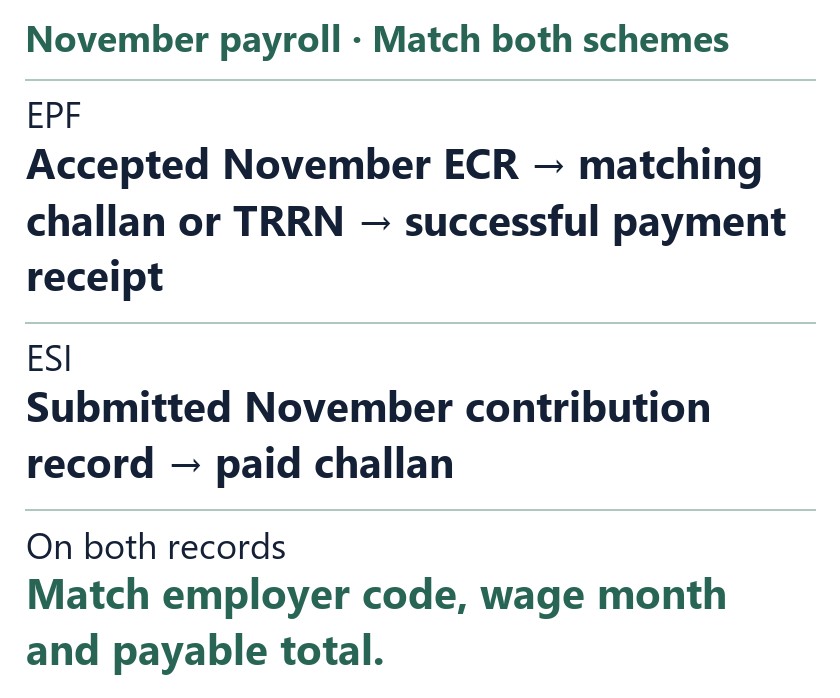
A bank debit or an ECR acknowledgement alone leaves one check open. If two debits appear, match each against the portal reference before approving a second payment. File both receipts with the November payroll.
Frequently asked questions
One employee is missing. Can the challan total still match?
Yes. A payment can match the submitted return even if a covered employee was left out. Compare the payroll roster with the ECR or the ESI contribution list. Ask payroll to check the applicable correction or supplementary filing and retain its reference and any extra paid receipt.
The employee's PF passbook has not updated. Should we pay again?
Check whether the employee is on the correct month's ECR under the right UAN and whether that challan was paid. A member passbook entry can appear later. If those records match and the credit is still missing, ask payroll to trace the posting with EPFO using the paid reference.
What if we have workers supplied by a contractor?
Ask payroll which workers and periods are covered and under which establishment code the contractor reported them. Match the relevant worker list and paid proof for your site. A contractor's bill alone does not show that those workers were included.
What if only EPF applies?
Keep the EPF proof and payroll's reason ESI does not apply. Do not expect an ESI receipt in that case.
Official references
- EPF Scheme 2026, paragraph 28(3) (opens in a new tab)
- ESI General Regulations 2026, regulations 16, 18 and 19 (opens in a new tab)
- EPFO guide to the ECR and challans (opens in a new tab)
- ESIC monthly contribution guide (opens in a new tab)
- ESIC payment verification (opens in a new tab)
- EPFO employer resources (opens in a new tab)
- ESIC employer portal (opens in a new tab)